
AI Smart Classroom
Turn a one-lesson demo into a deliverable class loop; then connect it with the AI Learning Space for preview and catch-up — without merging them into one app
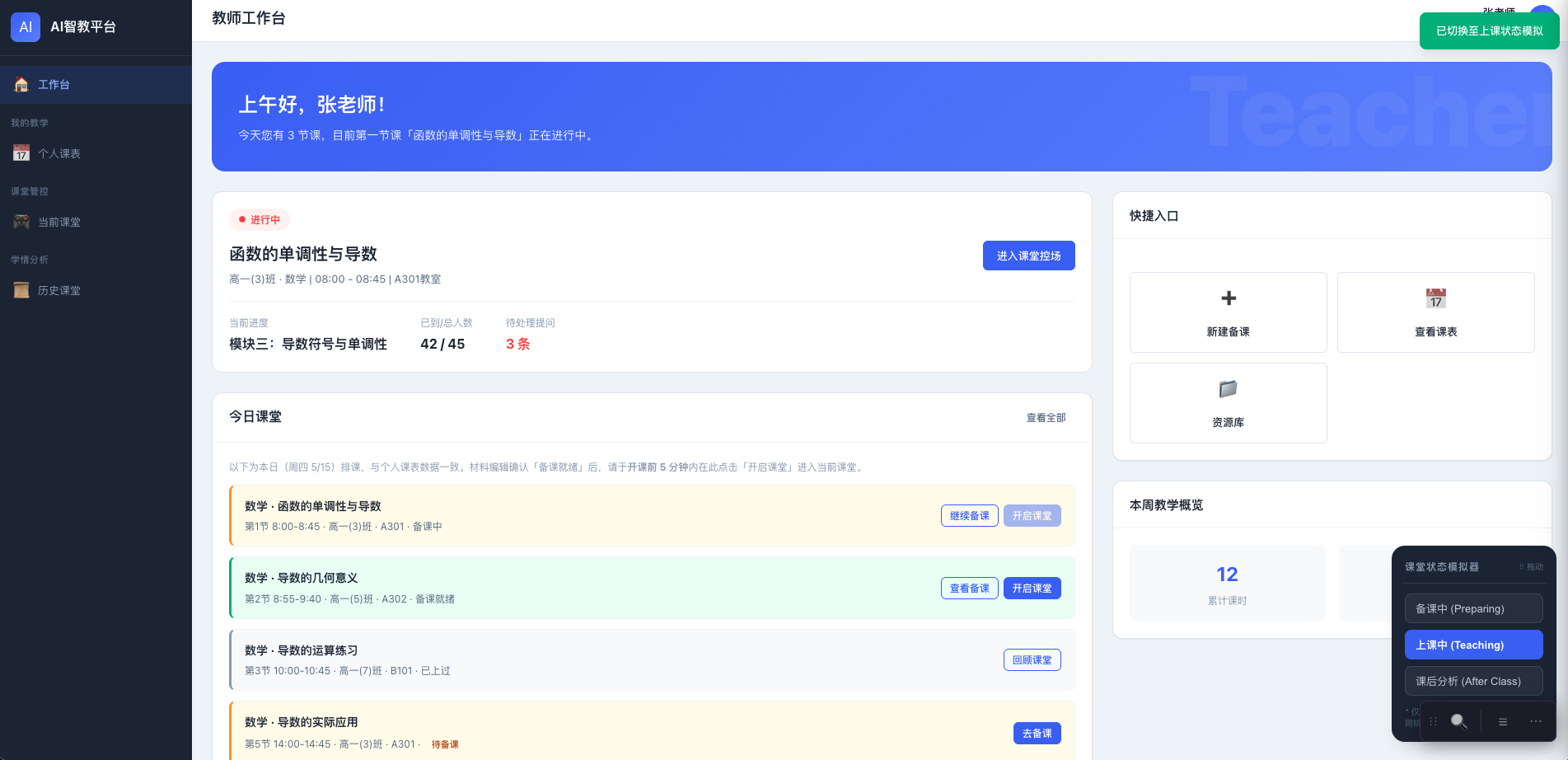
The teacher workbench organizes the day by timetable: an in-progress class goes to control, an unprepared class goes to prep, a finished class goes to review.
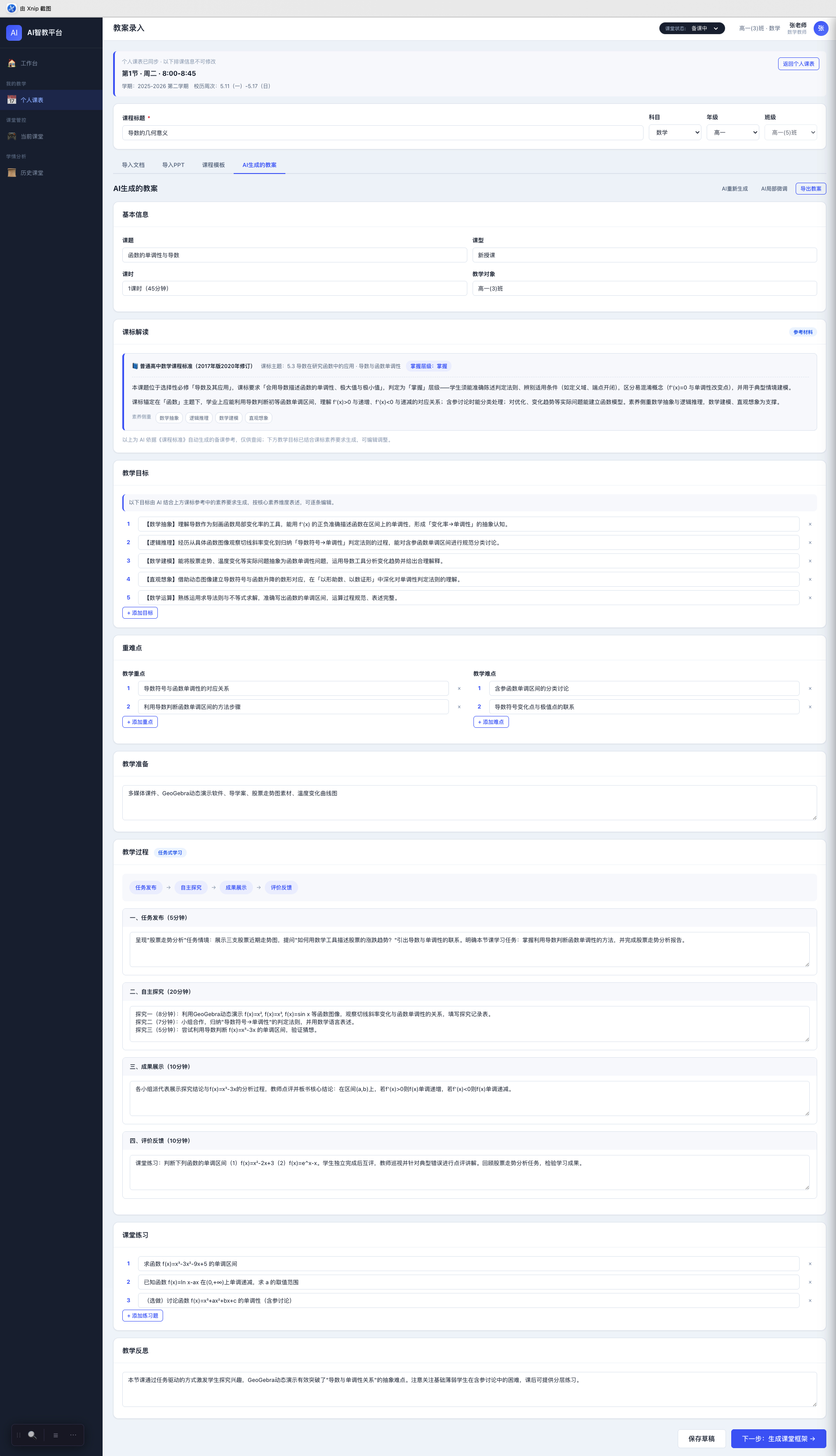
AI generates an editable lesson plan, not a long text that cannot be changed once handed over. After the teacher reviews it, the next step is the class framework.Hover the preview and scroll to see content beyond the frame
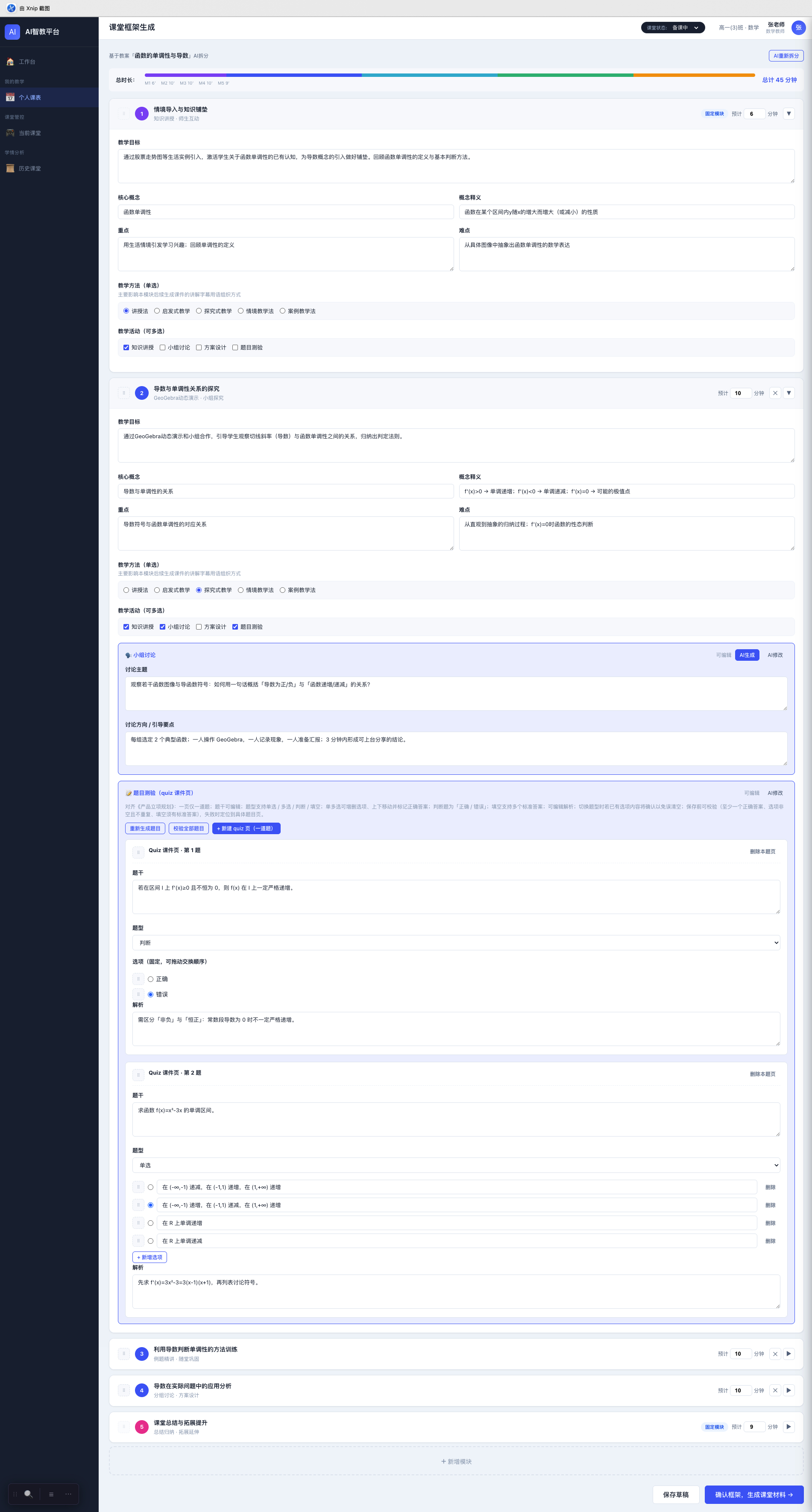
The lesson plan is split into timed class modules, with discussion and quizzes attached to the right steps. Only after the framework is confirmed are student-side materials generated.Hover the preview and scroll to see content beyond the frame
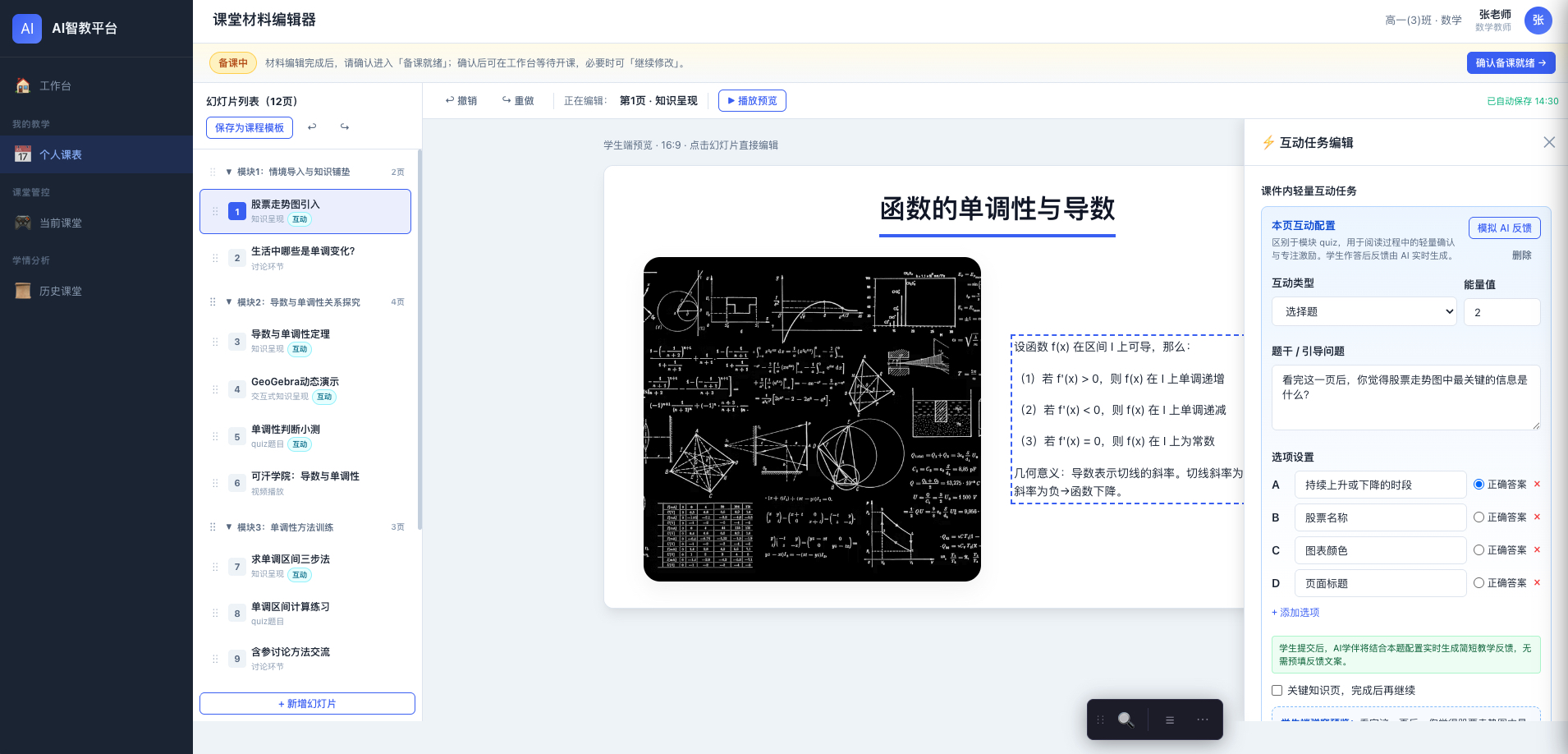
The class-material editor puts modules, slides, and in-class interaction on one screen. Teachers edit a structure they can teach from, not another version of a PPT.
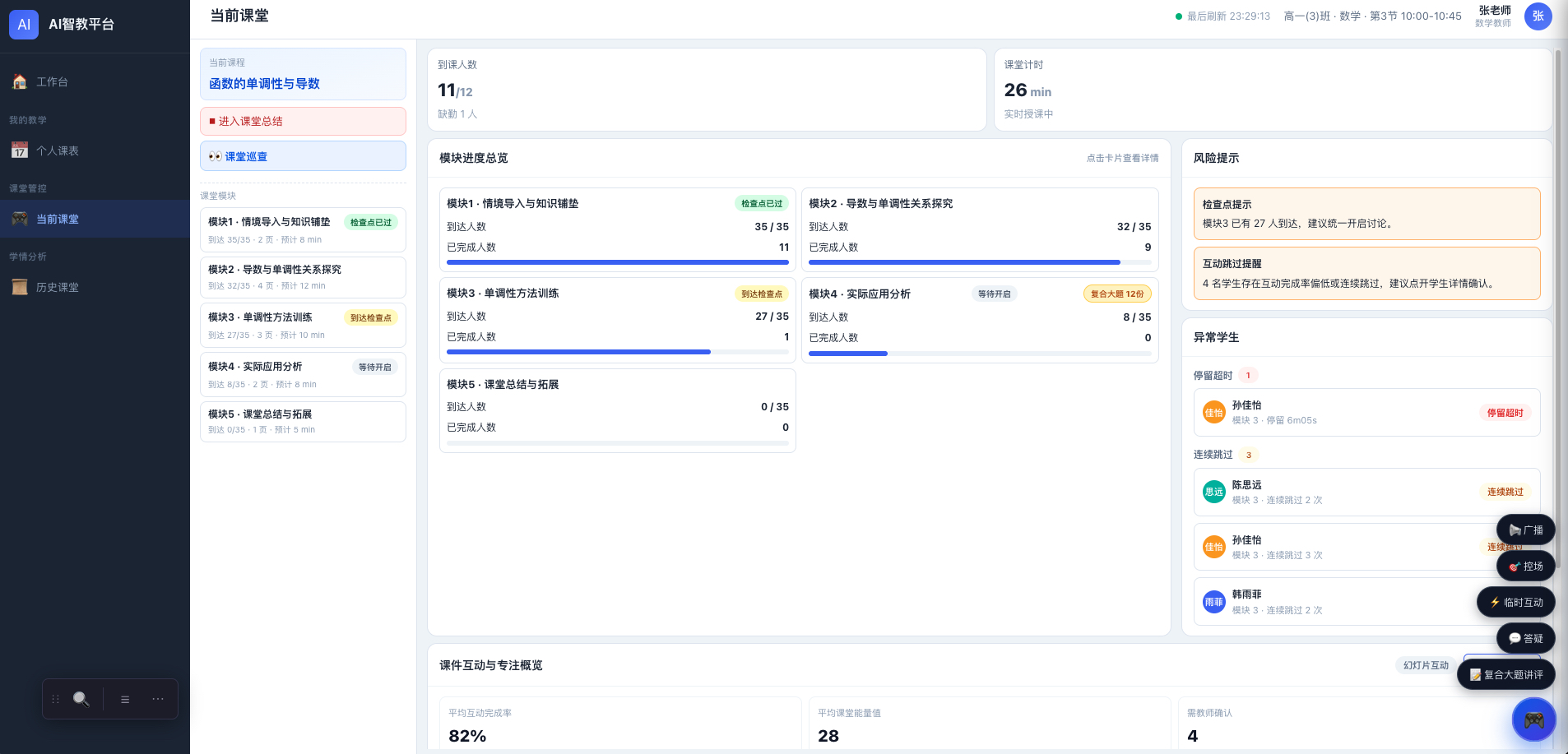
During class the view is module progress, who is stuck, and who skipped interaction — not only who is present. Control actions sit on the same wall.
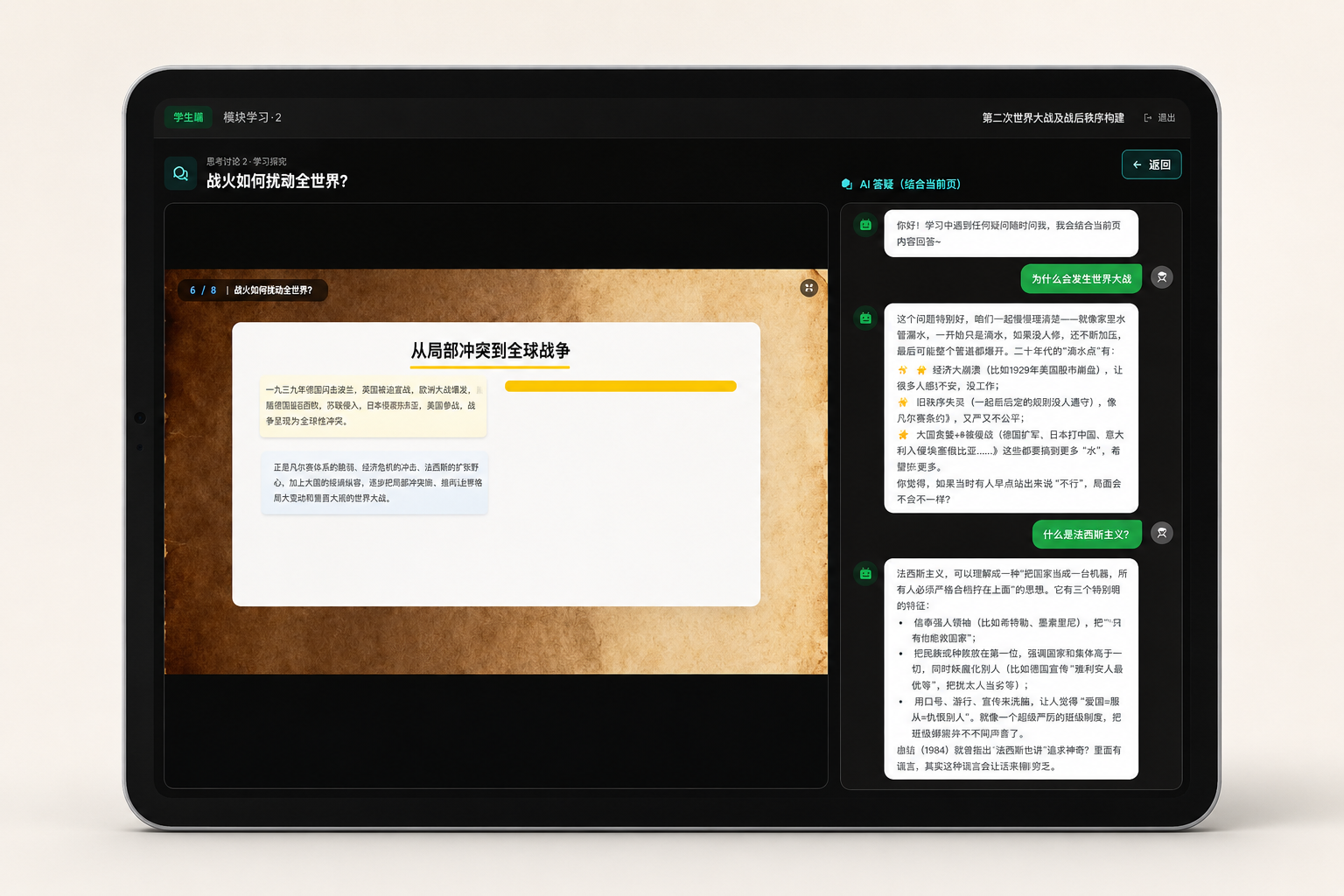
Students see the current slide on the terminal. AI Q&A stays with this page, rather than opening a generic chat box detached from the class.
What this product does
AI Smart Classroom is not moving a PPT onto a tablet, and not an interaction plugin for a smart blackboard. It is for one class a teacher organizes: lesson building, class-resource generation or reuse, student-terminal learning, live teacher monitoring, and after-class review, closed into one loop.
Before class, the teacher creates the lesson, sets learning goals, and uploads existing slides or lets AI generate class modules. During class, students learn by module on the terminal, complete tasks and quizzes, and when needed ask AI about this lesson. The teacher sees logins, progress, task completion, and quiz results at the same time. After class, the lesson is stored as an archivable class record, not a demo that disappears when playback ends.
It does not solve the same problem as the AI Learning Space. The Learning Space answers “how to study after class”: students self-study, ask questions, and take personalized quizzes at their own pace. Smart Classroom answers “how to organize, interact in, and review one class”: the whole class in sync, stages under control, process visible. The two products share people, classes, timetables, and resources in the school, but the use scenes cannot be mixed into one entry.
In 2025, lightweight lesson examples already showed that “AI + interactive class” can run in a real classroom. What still had to be built was turning a one-lesson custom demo into a standard product that many teachers, classes, and schools can use. Through July 2026, local school demand for this scene had not yet converged. I owned the object model, interaction prototypes, and the AI features and workflows in them, and planned the later boundary for connecting with the Learning Space.
Three product judgments
-
Schools already have strong lessons and slides from good teachers, and they also need to renew them under new curriculum guidance. In a period when old and new methods overlap, the safest path is not letting AI invent a class from nothing. It is standing on existing slides, textbooks, and teaching requirements, and turning good content into class resources that can be reused, explained, quizzed, and traced. When teachers need AI to read curriculum standards and build slides, give them reliable capability. The teacher remains the owner of the class.
-
The key to digitizing a class is not whether students have a screen, but whether the teacher can see if they are actually learning. The teaching floor has to be stable. Steps that must finish during class should be backed by structured data and pre-generated content; large models belong in lesson generation, in-class Q&A, and after-class summary — teachers and students should not wait on a model in the main path.
-
Class and self-study cannot merge into one app. What should connect is identity, organization, resources, and learning data, so students stay continuous across pre-class preview, in-class learning, and after-class catch-up. The two systems keep serving their own scenes and only exchange what they must, instead of rebuilding every product for “one platform.”
Those judgments set the next three steps: first make one class an executable standard loop; then make the process a traceable data object; finally plan how it meets self-directed learning, without folding the two products together.
Product design
01|From a one-lesson demo to a deliverable class loop
Early 2024–2025 lesson examples could show voting, simulation, study guides, and interactive pages. Each class was close to custom work and could not scale. After 2026, schools did not need another public class. They needed ordinary scenes — missing subjects, weak subjects, substitute teaching, reuse of good slides, exam review — where class can still start and stay stable.
I closed the MVP into a main path a teacher can finish: AI helps build the class, read curriculum standards, generate slides, split into 4–6 class modules, configure tasks and quizzes; students enter on the terminal; the teacher watches progress; the class is archived afterward. What AI helps generate is not a long-text lesson plan, but a structure the classroom system can run and the teacher can edit before publishing — modules, explanation, interaction, and quizzes all hang on the same class object.
If a school already has high-quality PPTs, the system prefers to take the teacher’s original design and let AI add explanation and tasks around the slides. In real use, teachers review before publishing. Generated content is not promised to reach master-teacher quality. Beta first makes this main path stable, then talks about richer interaction and after-class reports.
02|Turn one class into a traceable data object, not a one-time playback
Once a class starts, resources, tasks, and quizzes cannot be pulled off course by later edits. Publishing creates an immutable class snapshot: basic class information, slide version, task version, quiz items, student answers, and process data are archived together. Historical classes can be reviewed, and school-based resources can be reused in school — but reuse is of a template, not of rewriting the class that already happened.
The teacher console can control the learning process: who has logged in, which module they have reached, whether tasks are done, whether quizzes are submitted, and what accuracy looks like.
On the system, that is an object model and permissions, not a few extra dashboards. Timetable items, lesson drafts, slide templates, class snapshots, class instances, and student sessions are separate; templates can be reused in school, but only the creator can edit; administrators see aggregated data by default, not student privacy detail. School timetables use a two-stage import of parse, validate, preview, then write, instead of one backend script per school. The main class path is stabilized first. Deep device control and large-scale concurrency are later capabilities, not Beta must-haves.
03|Connect with the AI Learning Space, but do not merge
The end of class is not the end of learning. Students need to catch up on modules they missed during self-study; teachers need to see in the original class review “who caught up after class, and how.” If the two products become one super entry, the class’s sync rhythm and self-study’s personal rhythm will drag each other.
Phase one only connects two high-value paths. Before class: after preparing in Smart Classroom, a teacher can manually assign a preview task to the Learning Space; students complete it with their school account; completion flows back to the teacher. After class: the Learning Space reads historical classes the student attended; the student taps “continue learning” and restudies that class’s slides, quizzes, and summary; the catch-up process writes into the self-study behavior tree and learning report, and a summary flows back to the original class review. The original class snapshot stays read-only; catch-up can only append, not rewrite what happened then.
The two systems share teachers, students, administrative classes, timetables, schedules, and school accounts, and can access each other’s slides, Course Voice, textbook knowledge base, item bank, video, and interactive resources. Smart Classroom keeps depositing class snapshots, review, and teacher prep records; the Learning Space keeps depositing self-study behavior, quizzes, mistakes, learning reports, and student memory. Phase one explicitly does not merge systems, does not force tasks because “you did not understand,” and does not continue learning on a family-side app. First let class content enter self-study, and let self-study results come back to class.
How the product is organized
For teachers, students, and school administrators, the product splits into a teacher workbench, student terminal, and school platform. The teacher side owns lesson building, module editing, in-class monitoring, and after-class review; the student side learns, answers, and asks by class stage; the school platform takes timetable, class, class records, and later device management.
Before class, prep starts from the timetable; during class, a class instance runs; after class, it returns to snapshot and review. Generative AI appears only in lesson organization, Q&A around this class, and the planned after-class summary. It does not control class pace.
The relationship with the AI Learning Space has three layers: underneath, shared master data and resources; in the middle, independent business data plus a small amount of class catch-up packs, preview tasks, and catch-up records that must be shared; on top, still two apps — one for class, one for self-study. Teacher prep preferences do not mix into student self-study profiles; the Learning Space does not take over the class state machine.
Results and limits
What exists now is a deliverable Beta, not a daily classroom system already scaled into production. The main path can support lesson building, module generation, student-terminal learning, in-class tasks and quizzes, teacher progress views, and archiving a class. It also produced 20+ high-fidelity core-page prototypes, plus the object model, permissions, metrics, and school timetable plan, to support engineering and pre-sales language.
Planned capabilities not counted as Beta results include: keeping more of the teacher’s original slide layout and motion, a fuller in-class monitoring board, student class summaries and teacher insight, large-scale concurrent classes, deep terminal-device control, and the preview / catch-up connection with the AI Learning Space. The connection plan already has phase-one acceptance criteria written down, but it is still a plan, not a function already running in schools.
What this project has to prove is not one more classroom screen. It is that a real class scene can be closed into a product that is executable, monitorable, and reviewable — and that when it meets self-directed learning, the boundary holds: scenes stay separate, data connects, the main path is stable first.
MY CONTRIBUTION
- Abstracted a standard product from multi-school classroom demos, defined an MVP loop of pre-class building, in-class monitoring, and after-class review, and drove it to a deliverable Beta
- Designed AI output as structured modules the classroom system can run and teachers can edit, not an uncontrollable long text; an immutable snapshot is created when a class is published
- Built the class object model, data permissions, metric definitions, and school timetable import constraints, so a class moves from a demo lesson to a copyable in-school system
- Planned the boundary with the AI Learning Space: two systems keep separate scenes, share identity, class, timetable, and resources, and first connect pre-class preview and after-class catch-up
PROJECT OUTCOME
- Formed a deliverable Beta: teacher lesson building, class-module generation, student-terminal learning, in-class tasks/quizzes, teacher progress views, and class-data archiving
- Delivered the object model, data permissions, metric definitions, and 20+ high-fidelity core-page prototypes to support later engineering and pre-sales demos
- Completed a phase-one plan to connect with the AI Learning Space: preview-task assignment, historical class catch-up packs, and catch-up data flowing back — with no system merge
Scope note: Beta covers the main classroom path and can support delivery and demos. Full after-class reports, deep terminal control, and the Learning Space connection are planned capabilities.